
Picture of Written by Christoffer Andreasson

Written by Christoffer Andreasson

Head of Content at Promote

Ask most L&D teams how to improve engagement in their LMS, and the answers cluster around the same handful of tactics: badges, leaderboards, shorter videos, a nicer interface. None of that is wrong. Gamification can genuinely make a course more interesting to sit inside. The problem is treating it as the whole answer. On its own, it doesn’t explain why people weren’t engaging in the first place, because low engagement is usually a signal that the course wasn’t built to connect to anything beyond itself. Real engagement isn’t people spending more time in the LMS. It’s people caring enough about what’s inside it to actually use it afterward, and that depends on more than how the platform looks and feels.

What actually drives engagement, beyond how the platform feels?

  • A named destination.

    Before touching the course itself, get specific about what "engaged" is standing in for, and how it connects to something the business actually cares about, not just whether the training ran on schedule or whether attendees liked it. Without that link named up front, every tactic defaults to optimizing attention instead of the outcome attention was supposed to serve.

  • A manager who doesn’t disappear.

    This is the single biggest lever, more than what happens during the session itself. If a manager doesn’t know a program is happening, doesn’t help the participant prepare for it, and doesn’t ask what changed afterward, the signal is that it didn’t matter enough to follow up on, and engagement drops to match.

  • Participants who arrive prepared, not cold.

    A short pre-task, a question to think about, a real example from their own work to bring, means participants show up already invested rather than encountering the content for the first time when it starts. It also gives the manager something concrete to help with before the session even begins.

  • Learning stretched across time, not delivered in one sitting.

    A single long session generates a burst of attention that fades fast. Spreading the same content over weeks instead gives people time to actually try something between sessions, and creates natural check-in points along the way rather than one and done.

  • Something to apply, not just watch.

    Content that only needs to be consumed produces exactly the kind of engagement that looks fine in a dashboard and means nothing afterward. Content that requires participants to bring something of their own, like a real scenario from their job, a decision they’re actually facing produces far higher actual engagement, because there’s something at stake.

Why don’t more L&D teams build engagement this way?

Badges and leaderboards are the default because they’re fast to add and easy to point to in a report. Naming a specific outcome, involving managers, building in prework, and stretching content over time all take more coordination and show results later.

What should you check before adding another engagement feature?

  • Can you name what "engaged" is supposed to predict, and what business result it connects to?

    If the answer is vague, no feature will fix that. The target has to exist before anything can aim at it.

  • Does a manager know this program exists, help the participant prepare, and ask about it later?

    If nobody outside L&D is expecting a result, participants will treat the course accordingly.

  • Does anything happen before the session starts, or does engagement only begin when it does?

    Arriving cold and arriving prepared produce very different levels of investment in the same content.

  • Is anything measured after the session ends?

    Login and completion data describes the platform, not what happened afterward. If nothing follows up weeks later, engagement is being measured at exactly the wrong moment.

The point isn’t to abandon the tactics that make an LMS pleasant to use

Badges and clean design aren’t the problem, and they’re not nothing either, they’re one dimension of a bigger design, not a substitute for the rest of it. Pair them with a named destination, real manager involvement, preparation before the session, and time stretched across weeks, and the platform-level tactics start working with something real underneath them, instead of trying to manufacture engagement that has nowhere to go.

Picture of Written by Christoffer Andreasson

Written by Christoffer Andreasson

Head of Content at Promote

You’ve probably heard the pitch by now: learning journeys create lasting behavior change in a way a single course doesn’t. You’re convinced, and you want to start rebuilding the courses you already run. Here’s a concrete guide to actually doing it, step by step. Hint: no need to start from scratch, and no need to throw out what you’ve already built.

Spoiler: you don't need to start from scratch, and no need to throw out what you’ve already built.

1. Think about the purpose and the result you actually want

Start by asking yourself a simple question: what’s this course actually for, and what should be different afterward? Not what it covers, but what someone should be doing differently once it’s over.

Most courses are built around a topic ("leadership skills," "negotiation," "onboarding") rather than a clear purpose, so this is often the first time that purpose gets put into words. Write it down as one specific sentence, every other step in this guide uses that exact sentence, not a general sense of it.

2. Split your existing content across a timeline instead of one sitting

Take the material you already have and break it into stages spread over weeks instead of delivering it all in one session. Use the sentence from Step 1 as the filter: content that builds directly toward that specific result stays, and content that doesn’t can usually be trimmed or moved to optional material. Decide what belongs before the main event (context, a pre-task), what belongs during it (the part that’s genuinely better live), and what belongs after it (practice, application, reinforcement), all judged against that same sentence.

3. Add a manager checkpoint your course doesn’t currently have

Pick two moments, right before your course starts, and a few weeks after it ends, and build a short, specific prompt for a manager at each one, written around the exact sentence from Step 1. Instead of "how did it go," it becomes something like "has [name] started doing [the specific behavior] yet?" Tie it to something the manager is already accountable for that quarter. Of everything in this guide, this is usually the single change that does the most for whether the course actually sticks.

4. Build a follow-up into the course you didn’t have before

If your course currently ends with a feedback survey, add this alongside or in place of it: a short, specific follow-up sent a few weeks later that asks directly about the Step 1 outcome, not "what did you take away," but "have you tried [the specific behavior], and what got in the way?" This is a new stage tacked onto the end of what you already run, it doesn’t touch the original content at all.

5. Swap your success metric before you run it again

demo Before your next cohort goes through the course, decide how you’ll measure whether the outcome from Step 1 actually happened, not whether people liked the session. That might be a manager observation, a short self-report tied to the specific behavior, or a check against real work output. Put it in place before the next run, not after, so you’re not trying to measure something retroactively once the course is already over.

Start with one step, not all five at once

You don’t need to rebuild the whole course in one pass to see this guide through. Add the manager checkpoint first, or the follow-up, and layer in the rest over your next few runs. Each step you add makes the course a little more of a journey and a little less of a one-off event, and you’ll have real behavior-change data to show for it well before you’ve finished all five.

Congrats, Almost there!

A few things to consider before trying the platform:

And to make it as easy as possible...

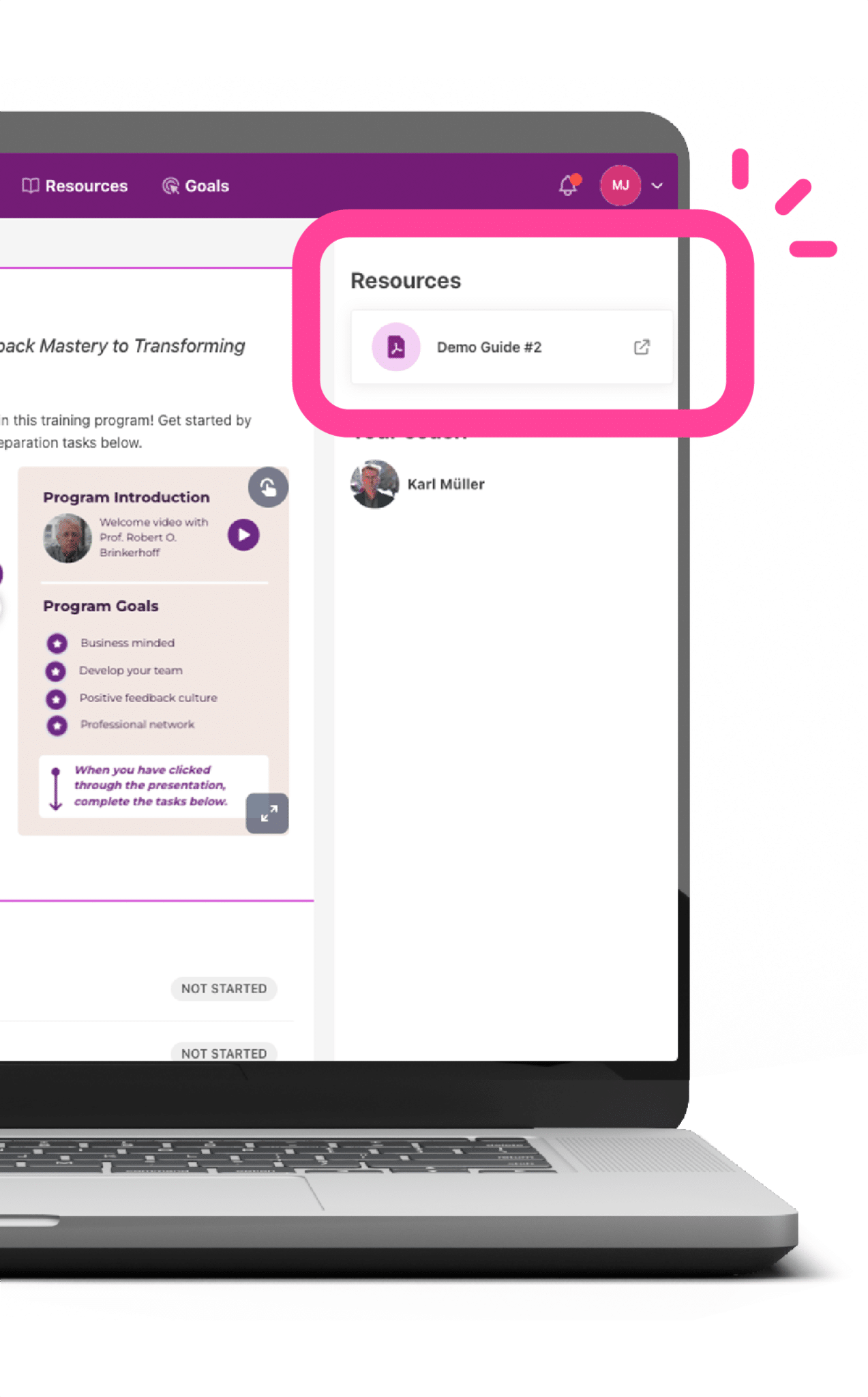
…there’s a Demo guide within each module, explaining all the nifty features of the Promote Platform! You can find it under resources on the right hand side of the screen.